Picking the right project management (PM) tool can make or break your team’s productivity.
The right tool turns chaos into clear plans, owned tasks, and smooth collaboration.
This article will show you how to choose a PM tool that actually helps your team get more done, with less stress.

Why Your PM Tool Matters
A strong project management tool is the control center for your projects.
It turns big ideas into clear tasks, assigns owners, tracks progress, and keeps all communication in one place so deadlines don’t slip and scope doesn’t explode.
It gives everyone a single, reliable view of who’s doing what, by when, and why.
In today’s fast-moving, often remote teams, a solid PM tool isn’t a nice-to-have—it’s essential for productivity, team morale, happy clients, and a healthy bottom line.
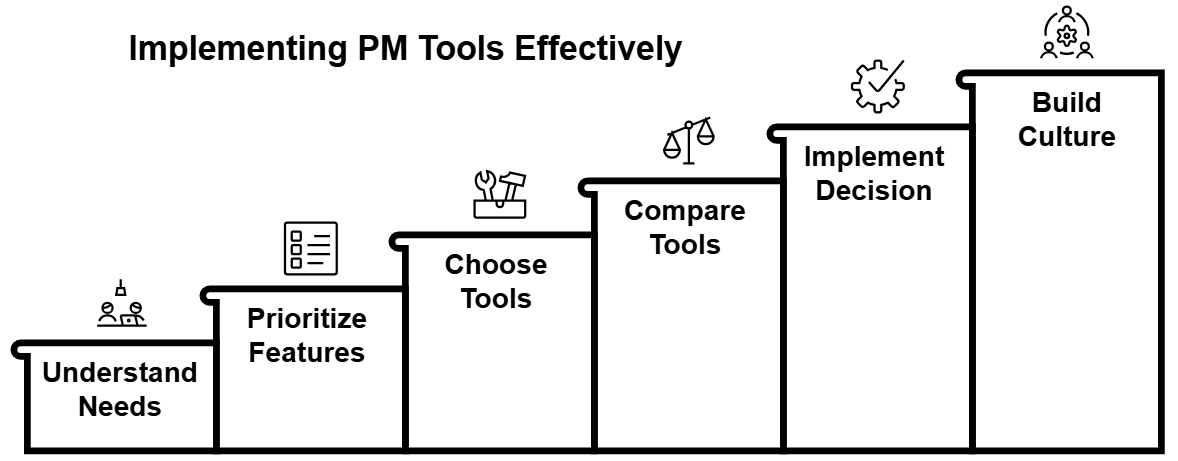
Step 1: Understand Your Team’s Needs
Before evaluating tools, get clear on what your team actually needs.
Skipping this step often leads to buying something “powerful” that no one really uses.
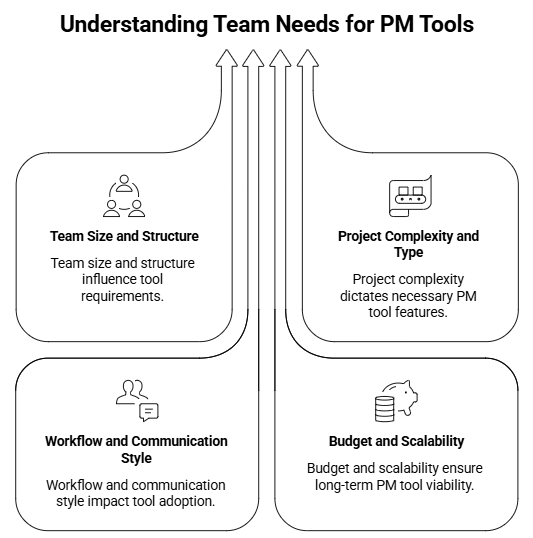
Let’s break down the 4 areas to explore first. Team size and structure, the complexity of the project, workflows and communications, and last the budget and scalability.
Team Size and Structure
Start by looking at how big and how structured your team is.
Smaller, tight-knit teams may thrive with simple, visual tools like Trello that show everything at a glance.
Larger or more hierarchical organizations typically need features like role-based permissions, advanced reporting, and workflow automation offered by tools such as Wrike or Jira.
Consider whether your teams are cross-functional, siloed by department, or a mix; this shapes how much you need inter-team collaboration, shared boards, and visibility across projects.
Project Complexity and Type
Consider the typical complexity and nature of your projects.
Straightforward campaigns or simple operational work might only require basic task lists, due dates, and assignees.
In contrast, complex software development, R&D, product development, or construction projects often demand Gantt charts, dependencies, critical path analysis, and resource management.

Think about project timelines, too: short sprints versus multi-month or multi-year initiatives will push you toward different depth and planning capabilities.
Workflow and Communication Style
Next questions you will want to ask are:
- How your team prefers to work?
- Are they structured and process-driven, or more flexible and adaptive?
- Do they rely on real-time chat or asynchronous updates?
Teams that already use Kanban-style boards might adopt tools like Trello or Asana board view quickly, while spreadsheet-heavy teams may transition more smoothly into Smartsheet.
Pay attention to how feedback is given, how documents are shared, and how blockers are resolved. The tool should support existing rhythms while improving clarity, not force everyone into a completely foreign way of working.
Budget and Scalability
Be clear on budget and long-term needs. PM tools range from generous free tiers for small teams to costly enterprise platforms.
Look beyond today’s headcount and consider where you might be in two to five years. Will you need more users, more advanced features, or deeper integrations?
A tool that can scale with your growth reduces the pain and cost of switching later. Factor in add-ons and integrations, not just the headline subscription price.
Step 2: Key Features to Prioritize
Once you understand your context, you can evaluate tools based on features that actually matter for your team, rather than being distracted by every new buzzword.
Task Management and Tracking
Task management is the foundation of any PM tool. At a minimum you need to create, assign, prioritize, and track tasks. Useful capabilities include:
- Due dates, subtasks, recurring tasks, and dependencies
- Clear visibility into who owns what and when it’s due
- Multiple views such as lists, Kanban boards, calendars, and timelines/Gantt charts
These make it easier for different working styles and project types to coexist in the same tool.
Collaboration and Communication
Projects are team sports. Strong tools keep conversations close to the work itself through:
- Comments on tasks and @mentions
- File attachments and document links
- Notifications that surface relevant updates without spamming everyone
When communication lives near tasks, you reduce endless email threads and scattered chat messages, and people can quickly see the context behind decisions.
Reporting and Analytics
To manage effectively, you need visibility into performance and risk. Look for dashboards and reports that reveal:
- Project progress and completion rates
- Team workload and capacity
- Time spent on tasks or phases
- Bottlenecks and overdue work
These insights help you make better decisions, improve processes, and communicate status to stakeholders or clients.
Integrations with Other Tools
Your PM tool should fit into your broader tech stack, not sit on an island. Useful integrations often include:
- Communication tools (Slack, Microsoft Teams)
- File storage (Google Drive, OneDrive, Dropbox)
- CRM and sales tools (Salesforce, HubSpot)
- Developer tools (GitHub, GitLab, Bitbucket)
- Finance or invoicing systems
Integrations reduce manual data entry, create smoother workflows, and keep everyone working in familiar systems.
User Interface and Ease of Use
Adoption dies quickly when a tool feels clunky. A clean, intuitive interface shortens the learning curve and encourages everyday usage. Evaluate:
- How long it takes a new user to create and update tasks
- Whether navigation is obvious and consistent
- How configurable views are, without overwhelming users
The more inviting and straightforward the experience, the more likely your team is to embrace it.
Step 3: Choose the Tools
Next step is to actually select the tools you are going to use.
This can be tough with all the options out there but we have created a quick hit list based on the a few popular use cases.
Here is a curated set of popular tools, each with strengths for particular teams and use cases.
Popular Project Management Tools — Strengths by Use Case
| Asana | The Orchestrator of Tasks | – Flexible task management with clear ownership and cross-functional coordination. – Offers multiple views (list, board, calendar, timeline). – Great for marketing, product launches, and visibility across teams. – Integrates widely and includes strong reporting. |
| Jira | The Agile Powerhouse | – Dominates in agile and software development. – Supports Scrum and Kanban boards, sprint planning, and detailed reporting. – Highly customizable for complex, iterative projects, though less suited to simpler needs. |
| Trello | The Visual Workflow Wizard | – Uses intuitive Kanban boards to track progress from “To Do” to “Done.” – Best for small teams, personal projects, and simple workflows. – Power-Ups and integrations expand functionality. |
| Monday.com | The Customizable Workspace | – A visual, flexible platform for various workflows (marketing, HR, and more). – Allows custom boards, automation, and multiple views (Gantt, Kanban, calendar). – Strong for teams wanting an adaptable, integrated workspace. |
| ClickUp | The All-in-One Solution | – Combines tasks, docs, goals, time tracking, and whiteboards. – Highly customizable but feature-rich, requiring setup and onboarding. – Ideal for teams centralizing all work in one system. |
| Wrike | The Enterprise Work Management Platform | – Advanced project planning, resource management, and reporting. – Granular permissions and analytics suit large enterprises managing multi-project portfolios. |
| Basecamp | The Simple Project Hub | – Focuses on clarity and communication with message boards, to-dos, schedules, and file storage. – Great for agencies and mid-sized teams seeking simplicity without heavy PM tools. |
| Smartsheet | The Spreadsheet on Steroids | – Combines the familiarity of spreadsheets with project management. – Offers Gantt charts, automation, and real-time collaboration— ideal for operations, finance, and data-heavy teams. |
| Teamwork | The Client-Focused Collaborator | – Designed for client-service teams. – Includes task management, time tracking, resource planning, invoicing, and client portals for unified internal and client collaboration. |
Step 4: Comparing the Top Tools
It is time to compare the tools. To help make distinctions clearer, we will need to consider some critical dimensions: pricing, learning curve, customization, and scalability.
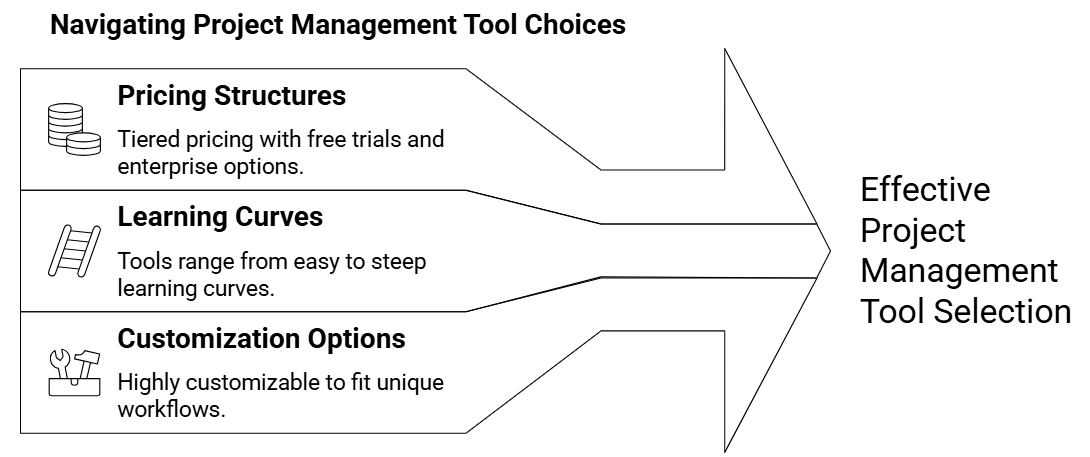
Pricing Structures
Most tools use tiered, per-user pricing, with features unlocked at higher tiers. Many offer:
- Free tiers or trials (common with Trello, Asana, ClickUp) for small teams or basic use.
- Per-user monthly or annual plans, often discounted for annual commitments.
- Enterprise plans with custom pricing for large organizations needing advanced security, governance, and support (common for Jira, Wrike, and others).
When comparing pricing, consider the all-in annual cost, not just the monthly per-seat number, and account for any paid integrations or add-ons you might rely on.
Learning Curves
Ease of adoption varies widely and has a real impact on rollout success.
- Low learning curve: Trello and Basecamp are very easy to understand, and teams can often get up and running in a single session.
- Moderate learning curve: Asana, Monday.com, and Teamwork balance depth with intuitive design, so basic use is quick, while advanced features can be learned over time.
- Steeper learning curve: Jira, ClickUp, and Wrike offer extensive configuration and advanced features, which require more training and setup. Smartsheet feels familiar to spreadsheet users but still needs orientation for its automation and project-specific capabilities.
Match the tool’s complexity to your team’s tech comfort and the time you can realistically invest in training.
Customization Options
Customization determines how closely the tool can mirror your actual processes.
- Highly customizable: ClickUp, Monday.com, Jira, and Wrike allow extensive control over workflows, fields, dashboards, and terminology.
- Moderately customizable: Asana and Teamwork offer flexible views, custom fields, and templates but stay more opinionated about structure.
- More constrained by design: Trello and Basecamp keep customization limited to preserve simplicity. Smartsheet enables deep customization at the data and automation level, but less in the core interface.
If your workflows are unique or likely to evolve, prioritize tools that let you adapt the system to your process rather than the other way around.
Scalability
Scalability is crucial if you expect substantial growth or increasing project complexity.
- Strong scalability: Jira, Wrike, ClickUp, Monday.com, Asana, and Smartsheet handle more users, more complex work, and sophisticated reporting as you grow.
- Good scalability in client contexts: Teamwork scales well for growing client rosters and project volume.
- Moderate scalability: Trello can scale with Power-Ups but may become limiting for highly complex environments; Basecamp works best for focused teams and may feel constrained in very large, multi-department organizations.
Choosing a tool that can support your next stage of growth reduces the risk and cost of future migrations.
Step 5: Making and Implementing the Decision
Once you have a short list, move from theory to practical testing.
Use Trial Periods Wisely
Most tools offer a free trial. Treat this like a serious test:
- Configure a realistic project with tasks, assignees, and deadlines
- Try commenting, attaching files, and generating a basic report
- Evaluate how natural it feels for typical daily workflows
Hands-on use reveals usability issues and gaps that feature lists do not.
Gather Team Feedback
Involve a small, representative group of end users in the evaluation. Ask structured questions such as:
- Was it easy to find and update your tasks?
- Did notifications feel helpful or noisy?
- What felt confusing or frustrating?
Their experience and buy-in are critical. A tool chosen only by leadership without user input often struggles to gain adoption.
Run a Pilot Project
Once you have one or two finalists, run a real, low-risk project in each tool. Use this pilot to see how well the tool fits:
- Your existing communication patterns
- Handoffs between roles or teams
- Reporting requirements from stakeholders
Document pain points and unexpected advantages. This real-world trial often makes the best choice obvious.
Plan Implementation and Training
After choosing a tool, treat implementation as its own project.
- Consider a phased rollout, starting with one team or project type
- Provide deliberate training through workshops, short videos, and cheat sheets
- Define usage standards (for example: every task must have an owner and due date; use tags consistently; where to log bugs or requests)
- Appoint one or more internal “champions” who learn the tool deeply and support others
Clear guidelines and internal advocates significantly improve adoption and consistency.
Step 6: Beyond the Tool – Building a PM Culture
A PM tool cannot fix unclear priorities, weak communication, or missing processes on its own. Its impact is multiplied when paired with a healthy project management culture. Focus on:
- Clear goals and expectations for each project
- Ownership and accountability at the task and outcome levels
- Honest, regular communication about progress and blockers
- Continuous improvement of workflows and habits
The right tool should support and reinforce these practices, not replace them. Invest in your processes and people first, then let the platform amplify their efforts.
Project Management Symposium
Looking to hear more insights from Industry Experts?
You should join us at this year’s Project Management Symposium.
Visit our Website HERE to learn more!

Project Management Programs
Are you looking to expand your project management skills?
With more than 50 courses and 17 professional certifications, our programs are built by industry experts and UMD faculty to address real-world challenges in today’s workplaces.

Some of our most popular certifications include:
- Agile Project Management – Navigate complex projects with adaptive frameworks.
- Construction Management – Strengthen your management expertise in construction projects.
- Artificial Intelligence in Government Procurement – Unlock the power of artificial intelligence to revolutionize government procurement.
- Project Management Professional (PMP) Exam Prep Training – Prepare for the PMP exam with confidence.